 SmartHub
 Automation
 Appointment Scheduler
 Lead Management
 Dashboard & Reports
 Task Management
 Communications Hub
 Managed chat
 Voice Receptionist
 Appointment scheduling
 Retainer signing
 Home services
 Lawyers and firms
 Medical services
 College admissions
 Real estate agents
 Marketing agencies
 About
About Partner program
 Estimate Your ROI
 Case Studies
 Blog
Blog FAQs
FAQs Login
LoginAutomation Should Remove Work - Not Create More of It




Products
Industries
Company
Resources

Automation usually enters a business with a promise: less work.
A lead fills out a form, so the CRM creates a record automatically. A salesperson gets a notification. A follow-up email goes out. A task appears in the pipeline. A message lands in Slack. If the lead does not respond, another sequence starts. If they book a meeting, the calendar updates. Somewhere else, a dashboard records the activity.
Individually, every step sounds efficient.
But then Monday morning arrives.
The salesperson has 23 notifications waiting. Three are about the same prospect. The CRM says the lead needs follow-up even though they replied over the weekend. Marketing's automation platform has already sent another email. Someone has to check whether the meeting was actually booked, dismiss two redundant tasks, update a field that failed to sync, and explain to a colleague why the prospect received two messages within an hour.
The business automated the process. Somehow, the people doing the work became busier.
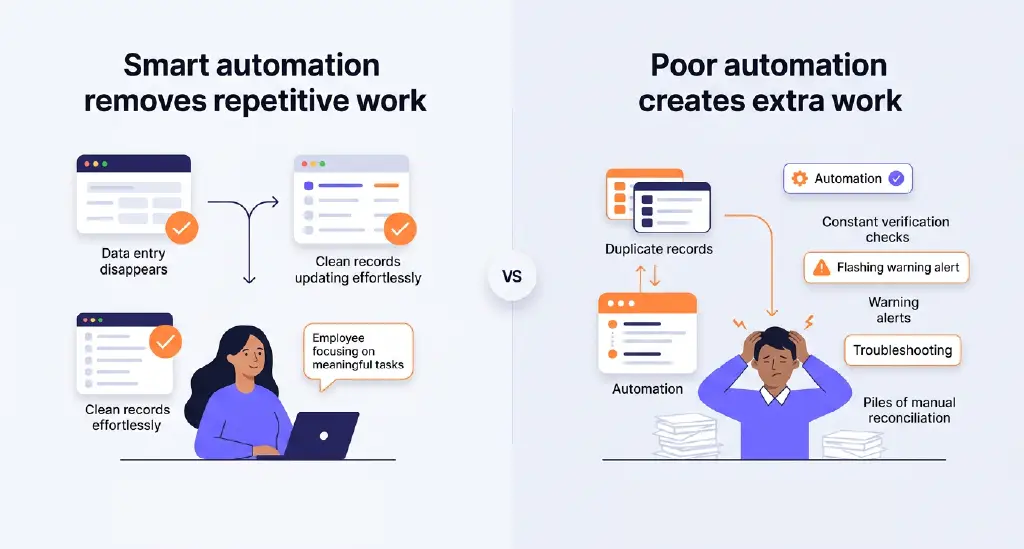
This is one of the uncomfortable realities of business process automation: adding automation and reducing work are not necessarily the same thing. When automation is layered onto fragmented processes without considering how information, decisions, and people move through them, it can create a second operational system that employees have to manage.
Instead of removing work, automation starts producing it.
Businesses rarely wake up one morning and deliberately build an overly complicated technology stack. Complexity accumulates gradually.
One team buys a tool to solve lead routing. Another introduces software for scheduling. Marketing adds an email platform. Sales needs a CRM extension. Customer service adopts a separate messaging tool. Operations connects several of them through integrations.

Every purchase solves a legitimate problem.
The difficulty appears between those solutions.
A lead may now exist simultaneously in a website platform, CRM, inbox, scheduling application, marketing automation platform, and reporting dashboard. Each system has its own rules about what should happen next.
When those rules are not coordinated, automation stops behaving like one workflow and starts behaving like several workflows competing for the same customer.
That is why a strong automation strategy should begin with the process, not the software.
The question is not, “What else can we automate?”
It is, “What work should no longer need to happen?”
That distinction sounds small. Operationally, it changes almost everything.
Also read: Top 10 Sales Automation Software for Growing Sales Teams
Image idea: A visual progression showing a simple workflow gradually becoming tangled as additional triggers, tools, integrations, notifications, and exceptions are added. The final stage should look noticeably harder to manage than the original manual process.
Technical teams have long talked about “technical debt”: shortcuts or outdated decisions that make systems progressively harder to maintain.
Businesses can accumulate something similar with automation.
Call it automation debt.
It develops when workflows, triggers, integrations, exceptions, notifications, and tools keep accumulating without anyone simplifying the underlying system.
Imagine a company creates an automation that assigns every new website lead to a salesperson. Later, another workflow is added to notify a sales manager when a high-value lead arrives. Then marketing introduces lead scoring. A fourth workflow alerts the salesperson when the score crosses a threshold. Another sends an SMS. Another creates a task if there is no response.
Six months later, nobody is entirely certain which automation owns the next action.
Changing one field in the CRM may activate three workflows. Turning one automation off might quietly break another. Employees begin developing manual workarounds because they no longer trust what the system will do.
At that point, the organization is not benefiting from automation. It is maintaining it.
And maintenance is work.
Notifications are one of the easiest places to see automation debt in action.
Alerts feel productive because they create visibility. If something important happens, surely someone should know.
The problem is that importance does not multiply simply because five systems announce the same event.
Consider what happens when a prospect requests a consultation. The salesperson might receive a CRM notification, an email, a Slack alert, a calendar notification, and a task reminder.
The company has technically automated awareness.
The employee still has only one thing to do: respond to the prospect.
Everything beyond the notification that helps them take that action is overhead.
Worse, excessive alerts can make genuinely important events harder to notice. This is the paradox of automated visibility: when everything demands attention, attention becomes harder to allocate.
A dramatic real-world example came from Knight Capital in 2012. A faulty software deployment caused its automated trading system to send millions of erroneous orders into the market. According to the U.S. Securities and Exchange Commission, an internal system generated 97 automated emails referencing an error before the market opened, yet the problem was not acted upon in time. The incident ultimately resulted in a loss of more than $460 million.
The scale is unusual, but the underlying lesson applies far beyond financial trading.
An alert is useful only when it reaches the right person, communicates something actionable, and makes the required response clear.
Automation that merely generates more signals can create noise rather than control.
Also read: Why Businesses Don't Have a Lead Problem - They Have a Qualification Problem

One reason business automation tools can look more efficient than they really are is that companies measure what the automation performs but not what employees must do around it.
Suppose a workflow saves a salesperson five minutes by automatically creating a lead in the CRM.
That sounds like a measurable win.
But what happens afterward?
If the salesperson spends two minutes checking whether the contact information synced correctly, another minute closing a duplicate task, and three minutes figuring out whether an automated email was already sent, the automation has not saved five minutes.
It has relocated them.
This hidden work appears everywhere in poorly designed automation.
People reconcile conflicting records. They check whether integrations worked. They dismiss irrelevant alerts. They correct automated categorization. They manually move conversations between systems. They explain duplicate communications to customers. They maintain spreadsheets because they do not completely trust the official dashboard.
None of this appears on a feature list.
Yet it determines whether workflow efficiency actually improves.
The best measurement of automation, therefore, is not how many actions a system performs. It is how many unnecessary human actions disappear.
Many automation failures begin before the first workflow is built.
A company takes an inefficient process and automates it exactly as it exists.
If a lead previously passed through four unnecessary handoffs, automation makes those four handoffs faster. If teams were maintaining duplicate customer records, integrations move duplicate information faster. If nobody clearly owned follow-up, automated reminders tell several people about the same unclear responsibility.
The inefficiency survives.
It simply moves at machine speed.
This is why asking why business automation fails often leads back to process design rather than technology.
Automation is excellent at repeating rules. It is not automatically good at deciding whether those rules make sense.
Before automating a process, businesses need to ask what would happen if the process were redesigned from scratch. Which approvals genuinely protect the business? Which handoffs exist only because systems cannot communicate? Which notifications actually change someone's behavior? Which fields need human input? Which steps could disappear completely?
Sometimes the biggest automation improvement is deleting a workflow rather than creating one.
Also read: What Smart Businesses Automate First — And What Still Needs a Human Touch
Tool sprawl adds another layer to the problem.
A business may have excellent software for every individual function while still creating a poor overall working environment.
The CRM handles customer records beautifully. The project management platform handles tasks beautifully. The communication platform handles internal conversations beautifully. The automation tool connects applications beautifully.
But an employee still has to move between all four to understand one customer.
This is where business process automation needs to be judged from the user's perspective.
How many places does someone need to check before they can act?
How many versions of the same information exist?
Where is the authoritative customer record?
If something changes, does the employee need to update one system or three?
The sophistication of individual tools matters less when the workflow connecting them remains fragmented.
An automation strategy should reduce the number of places people need to think, not merely increase the number of places where information can travel.
There is another danger in treating automation as inherently efficient: machines are exceptionally good at repeating the wrong action.
A human mistake might affect one customer.
An automated mistake can affect thousands before anyone notices.
Zillow's experience with Zillow Offers illustrates the broader risk of relying on automated systems at scale without adequately accounting for uncertainty. The company eventually shut down its home-buying operation after struggling to forecast home prices reliably enough to sustain the model at the scale it wanted. Zillow reported hundreds of millions of dollars in losses associated with the business and acknowledged the difficulty of predicting future prices consistently.
Customer workflows operate on a much smaller scale, but the principle is familiar.
A badly written follow-up email sent manually is one awkward interaction.
A badly designed sequence can send that interaction to every lead.
An incorrect routing rule can quietly send valuable opportunities to the wrong team for months. A broken status trigger can continue contacting customers who have already converted. A scheduling automation can keep generating reminders for appointments that were canceled somewhere else.
Automation multiplies efficiency when the underlying logic is good.
It multiplies friction when it is not.
Effective automation starts by looking at the human journey through the process.
Take lead follow-up.
A company might initially describe the goal as automating lead response. But that description is too narrow. The real objective is to make sure an interested prospect receives an appropriate response quickly and reaches the right next step without requiring unnecessary manual coordination.

That changes how the workflow gets designed.
Instead of asking which emails can be automated, the company examines the entire path from inquiry to conversation. Where does the lead enter? What information is already known? Who should respond? What happens if that person is unavailable? What should automation handle immediately? At what point does a human conversation become more valuable than another automated touch?
Good automation is built around outcomes.
Also read: Marketing Automation Agency: How AI Turns Leads Into Clients
That means a workflow should have a clear beginning, a clear owner, clear conditions for what happens next and, importantly, clear conditions for when automation stops.
The stopping rules matter enormously.
If a prospect replies, certain sequences should stop. If an appointment is booked, reminders designed to secure that appointment should no longer fire. If a human takes ownership of the conversation, the system should recognize that change rather than continuing to behave as though nobody responded.
Automation needs exits as much as triggers.
The strongest automation strategies also recognize that not every human action is a waste.
Repetitive administration is an excellent candidate for automation. Copying contact details between systems, assigning routine inquiries, recording standard activity, sending predictable confirmations, and surfacing forgotten conversations can all consume time without requiring much judgment.
A nuanced customer conversation is different.
A prospect who says, “I'm interested, but I need to talk to my partner first,” has not simply entered a new database state. They have communicated context.
A useful system preserves that context and helps the salesperson act on it later.
A poor system merely changes the lead status to “follow-up” and schedules five generic messages.
The purpose of automation should be to create more room for valuable human work by removing mechanical work around it.
That is fundamentally different from trying to remove humans from every process.
Complexity usually announces itself through employee behavior before it appears in a dashboard.
People start saying things like, “Ignore that notification.”
They create personal spreadsheets to track information already stored elsewhere.
They ask colleagues whether an automated message actually went out.
They keep duplicate tabs open because no single system shows enough context.
They manually check workflows that are supposed to eliminate checking.
Customers receive messages that make it obvious one part of the business does not know what another part has already done.
These are not simply employee habits. They are operational signals.
Another warning sign appears when nobody wants to touch existing workflows.
If changing a follow-up sequence requires a meeting simply because nobody knows what else it might trigger, automation debt has become structural.
Healthy automation should make operations easier to understand.
If the system requires increasingly specialized knowledge just to prevent it from creating problems, simplification is overdue.
Customers do not care how sophisticated a company's automation stack is.
They care that things work.
They care that someone responds when they ask a question. They care that they do not have to repeat themselves. They care that an appointment confirmation arrives at the right time. They care that a business remembers the conversation they had yesterday.
Employees want something similarly simple.
They want the information required to make the next decision without searching through five applications.
When automation works well, neither group spends much time thinking about it.
The prospect experiences continuity.
The employee experiences less administrative work.
The business experiences faster movement without adding unnecessary complexity.
That is what workflow efficiency should look like.
Not more triggers. Not more notifications. Not another dashboard displaying activity created by other dashboards.
Less friction.

The next phase of business automation will not be won by companies that automate the greatest number of actions.
It will be won by companies that understand which actions should exist at all.
That requires a different discipline.
Before adding another workflow, consider whether an existing one can be simplified. Before investing in a new tool, determine whether the real issue is a lack of technology or poor integration. And before creating another notification, be clear about what action it is meant to trigger.
And before celebrating hours supposedly saved, look for the manual work automation may have quietly created somewhere else.
The goal of business process automation was never to make businesses look more automated.
It was to make work easier.
When systems understand where a customer is, preserve the context of previous interactions, and help teams move conversations forward without unnecessary administrative effort, automation becomes what it was supposed to be: infrastructure that supports people rather than another layer they have to manage.
For businesses seeking to simplify lead engagement rather than add more disconnected workflows, Blazeo brings AI-powered, human-supported conversations together across the customer journey. The opportunity is not to automate every possible touchpoint. It is to ensure technology handles the repetitive work, so your team can focus on the conversations and decisions that actually move customers forward.
That is the standard worth setting for automation: when it works, there should be less work left behind.

