 SmartHub
 Automation
 Appointment Scheduler
 Lead Management
 Dashboard & Reports
 Task Management
 Communications Hub
 Managed chat
 Voice Receptionist
 Appointment scheduling
 Retainer signing
 Home services
 Lawyers and firms
 Medical services
 College admissions
 Real estate agents
 Marketing agencies
 About
 Partner program
 Estimate Your ROI
 Case Studies
 Blog
 FAQs
 Login
Automation Isn’t Working If Your Team Keeps Working Around It




Products
Industries
Company
Resources


Automation is supposed to make work easier. Fewer repetitive tasks, faster responses, better coordination, and less time spent chasing information that should already be available.
Yet in many businesses, something rather different happens.
The company invests in new software, builds automated workflows, connects its CRM, and introduces tools designed to simplify everyday operations. A few months later, employees are still maintaining spreadsheets, setting personal reminders, forwarding emails, and messaging colleagues to make sure things get done.
The technology is there. The manual work hasn't disappeared.
In some cases, automation has simply become another system employees must manage alongside everything else.
This is one of the most overlooked problems in business process automation. A workflow can be technically functional without being particularly useful to the people relying on it. Tasks may trigger automatically, records may update, and notifications may arrive exactly as configured. But if employees still need to intervene repeatedly to keep things moving, the business hasn't necessarily solved the problem it set out to address.
Understanding why this happens requires looking beyond the software itself and examining how work actually moves through an organization.
Consider a growing service business that introduces an automated lead management system.
Every inquiry enters the CRM, receives an acknowledgment, and gets assigned to a sales representative. On paper, the process looks efficient. Nothing is being entered manually, and every lead has an owner.
But the sales team has developed its own routine.
Representatives check a shared spreadsheet to see which inquiries are genuinely urgent. They message one another to confirm who is following up. When someone is unavailable, another employee steps in after receiving a WhatsApp message. If a customer replies with an unusual request, the conversation moves to email because the automated workflow doesn't accommodate it.
The CRM continues recording activity, but the actual coordination happens elsewhere.
This distinction matters. The system is automating individual actions while employees are still managing the process connecting those actions.
Over time, these informal arrangements become part of everyday operations. New employees learn them from experienced colleagues. Managers rely on them without necessarily recognizing them as workarounds. Eventually, the business has two versions of its workflow: the one documented in its automation platform and the one employees actually follow.
The second version is often what keeps customers from falling through the cracks.
Also read: Automation Should Remove Work - Not Create More of It
When automation underperforms, businesses often assume they need better software, more integrations, or additional employee training.
Sometimes they do. But why business automation fails is often more closely connected to process design than technological capability.
Automation tends to work best when tasks follow predictable rules. Real business operations, however, involve exceptions, competing priorities, incomplete information, and decisions that depend on context.
A customer may submit an inquiry using one email address and follow up from another. A promising lead may need a response from a specialist rather than the assigned representative. An appointment may need to be rescheduled because a team member is unavailable. A conversation may begin as a general question and turn into an urgent service request.
If the automated workflow only accommodates the expected sequence, employees must handle everything that falls outside it.
The problem becomes more pronounced when automation is designed around how management believes work happens rather than how employees actually perform it.
A process map might show an inquiry moving neatly from capture to qualification to booking. It may not account for the three internal conversations needed to determine availability, the customer information stored in another application, or the approval required before confirming a particular service.
Those activities still exist after automation is introduced. They simply remain invisible to the system.
This is why an effective automation strategy should begin with understanding operational reality, including the inconvenient parts that rarely appear in formal process documentation.
Workarounds can appear harmless because they often solve an immediate problem.
A spreadsheet helps a manager track overdue inquiries. A personal reminder ensures someone follows up with a customer. An internal message gets a stalled approval moving.
Individually, these actions seem reasonable. Collectively, they create an additional layer of work that the automation was supposed to eliminate.

Asana's 2023 Anatomy of Work Global Index found that knowledge workers spent 58% of their day on "work about work," including coordination rather than their primary skilled responsibilities. Respondents estimated that better processes could save them 4.9 hours every week.
Not all coordination is unnecessary, of course. But when employees repeatedly check statuses, transfer information between systems, or remind colleagues about routine responsibilities, the organization is spending time maintaining its own processes.
The consequences extend beyond productivity.
When information exists in several places, employees may act on outdated details. A sales representative could contact someone who has already booked an appointment. A support agent might ask a customer to repeat information collected earlier. A manager reviewing the CRM may believe an inquiry is untouched, even though a colleague has been handling it through email.
The business also loses visibility into its operations. Decisions made in private messages or personal spreadsheets may never become part of the official record.
That makes it harder to identify bottlenecks, evaluate performance, or understand why certain opportunities were lost.
The cost of a workaround isn't always the time required to perform it. Sometimes, it's the information the business never captures.
Also read: Your CRM Has the Data. Why Is Your Team Still Asking the Customer?
When employees consistently avoid an automated process, the natural response may be to enforce compliance.
Management might insist that everyone update the CRM, stop using spreadsheets, or communicate exclusively through approved channels.
These expectations can be reasonable, particularly when security, accountability, or recordkeeping is involved. But enforcement alone rarely addresses the reason employees created alternative processes.
Imagine a customer support team that maintains a separate document containing answers to frequently asked questions. The organization already has a knowledge management system, so the additional document appears unnecessary.
A closer look reveals that the official system is difficult to search, takes too long to update, and contains information that no longer reflects current policies.
Employees aren't necessarily resisting technology. They're using the resource that helps them answer customers accurately and quickly.
The same pattern appears in sales, scheduling, intake, and customer service.
People develop shortcuts when the official process introduces friction. Sometimes the workaround is faster. Sometimes it provides missing context. Sometimes it's the only practical way to handle an exception.
This doesn't mean every workaround should become standard practice. Informal systems can create security risks, inconsistent customer experiences, and gaps in accountability.
But they do provide useful evidence.
Rather than asking why employees aren't following the automated workflow, businesses should investigate what the alternative process allows them to accomplish.
The answer often reveals a design problem that conventional automation reports cannot show.
A business might automate its lead acknowledgment, appointment reminders, and follow-up emails while still leaving employees responsible for connecting those activities.
This is the difference between task automation and meaningful workflow automation.
Task automation performs a defined action when a condition is met. Workflow automation considers how multiple actions, decisions, and responsibilities fit together to produce an outcome.
Take appointment scheduling.

An automated system sends a customer a booking link. The customer selects a time, receives confirmation, and gets a reminder before the meeting.
That sounds complete.
But what happens if the customer needs a particular specialist? What if the appointment requires information collected during the initial conversation? What if the customer wants to reschedule, or the assigned employee becomes unavailable?
If those situations require separate emails, calendar checks, and manual updates, only part of the scheduling process has been automated.
Effective automation needs to account for the surrounding work, not merely the booking itself.
Solutions such as Blazeo's Appointment Setting address several connected scheduling activities through calendar synchronization, CRM integration, automated reminders, and confirmation or rescheduling options. The objective is to reduce the number of disconnected actions employees must coordinate themselves.
The larger lesson applies well beyond scheduling: automating one visible step doesn't necessarily improve the complete customer journey.
Also read: How Business Automation Workflow Transforms Daily Operations
Many workflow problems become visible when responsibility moves from one person, department, or system to another.
Marketing captures a lead, but sales doesn't have enough information to qualify it. An AI assistant answers initial questions, but the human agent receiving the conversation lacks its history. A customer books a consultation, but the person conducting it doesn't know what was discussed beforehand.
The individual systems may be performing exactly as intended. The failure occurs between them.
Consider a prospective customer contacting a home services company about an urgent repair.
The chatbot collects the customer's name, contact details, location, and description of the problem. The inquiry is then forwarded to the service team.
If the receiving employee must open another application, retrieve the conversation, confirm the customer's location, and manually determine who is available, the automation has moved information without fully preparing the next action.
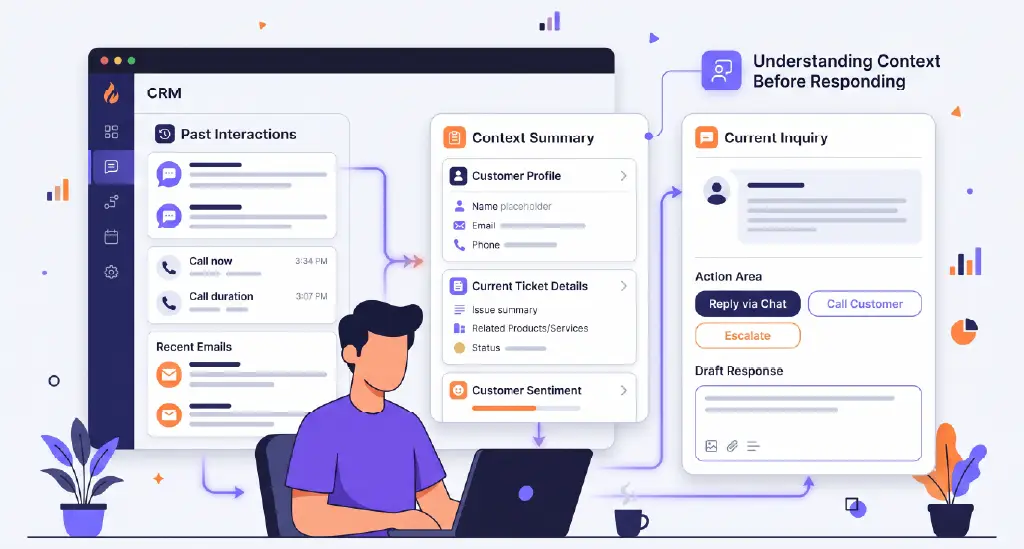
A more effective process would preserve the original context, identify the appropriate next step, and make the relevant information available to whoever takes responsibility.
This is particularly important when AI is involved.
AI can help classify inquiries, collect information, and initiate follow-ups, but it also needs clear boundaries. Not every customer request should be handled automatically, and not every decision can be reduced to a predefined rule.
Some situations require professional judgment, empathy, or approval.
The goal isn't to eliminate human involvement. It's to ensure that when a person needs to step in, they can continue the work without reconstructing everything that happened before.
For businesses handling leads across multiple channels, Blazeo's SmartHub Lead Management brings communications, activity history, appointments, and follow-up workflows into a more connected process. This helps teams work from shared customer context rather than repeatedly gathering information across separate tools.
It seems reasonable to assume that introducing additional automation will reduce manual effort.
But that depends on what is being automated and how the new tools interact with existing systems.
Suppose a business uses one platform for customer inquiries, another for email marketing, a separate scheduling application, and a CRM for sales activity.
Each system has its own automated notifications and status updates.
A new inquiry might generate several alerts, trigger duplicate follow-up sequences, and create records that employees must reconcile. Instead of removing administrative work, the automation increases the number of signals the team must interpret.
This problem is particularly relevant for sales organizations.
According to Salesforce's 2026 State of Sales research, the average seller spends just 40% of their time actually selling. The remaining time goes toward other responsibilities, making the quality of supporting workflows especially important.
Adding more automated activity won't necessarily improve that balance.
A notification that requires no action still demands attention. A duplicate customer record still needs correction. An automated follow-up sent without awareness of a previous conversation may create another issue for someone to resolve.
This is why automation should be evaluated according to the work it removes, not simply the number of actions it performs.
An effective system should reduce unnecessary decisions, duplicate data entry, and routine coordination.
If employees spend more time supervising automated activity than they previously spent completing the task, the business needs to reconsider the workflow.
Also read: Top 10 Sales Automation Software for Growing Sales Teams
Businesses often assess automation through system-level metrics such as successful triggers, completed sequences, and the number of tasks processed.
These measurements establish whether the technology is functioning. They don't necessarily reveal whether employees are doing less work.
To understand the difference, businesses need to examine the complete journey of an actual task.
Take a recently completed customer inquiry and trace it from the first interaction to the outcome. Identify where information was collected, where responsibility changed, which decisions required human input, and whether employees used any tools outside the official workflow.
The most revealing questions concern what happened between automated actions.
Did someone need to send an internal message before the inquiry could move forward? Was information copied into another system? Did a manager intervene because the automated assignment was incorrect? Did an employee create a reminder because they didn't trust the existing follow-up process?
These details expose operational dependencies that process diagrams often overlook.
It's also worth comparing routine transactions with unusual ones.
A workflow that handles standard inquiries efficiently may struggle with customers who change their minds, submit incomplete information, or require special attention.
Reviewing these exceptions can reveal whether the system supports real operational complexity or only its most predictable scenarios.
Employees should be involved directly in this assessment. They can often identify friction that managers and software vendors never encounter.
Importantly, the purpose should be to improve the process rather than penalize people for reporting workarounds. Otherwise, the business risks driving those informal practices further out of sight.
Once the gaps are visible, the next step isn't necessarily a complete system replacement.
Often, meaningful improvements come from redesigning the connections between existing processes.
Start with ownership.
Every automated workflow should make it clear who is responsible for the next action, when that responsibility begins, and what happens if the assigned person cannot complete it.
A lead should not remain unattended because its owner is unavailable. A customer request should not disappear because it falls outside an automated category.
Next, examine how information travels.
If a customer has already provided their contact details, service requirements, and preferred appointment time, that information should remain accessible throughout the relevant workflow. Employees shouldn't have to ask for it again simply because another department or application is involved.
Then consider the exceptions.
A well-designed process should distinguish between situations that can proceed automatically and those requiring human review. It should also specify how exceptions are routed, what context accompanies them, and how the outcome is recorded.
McKinsey's research on automation and the future of work helps explain why this matters. Its analysis found that while roughly half of work activities were technically automatable using demonstrated technologies at the time, only about 5% of occupations could be fully automated. The research highlights the importance of redesigning work around both technological capabilities and human responsibilities.
The practical implication is straightforward: automation should support employees where judgment is valuable and take over repetitive coordination where it isn't.
Businesses should also make improvements gradually.
Instead of redesigning every workflow simultaneously, choose a process with frequent manual intervention, establish a baseline, and test changes against actual operational outcomes.
For example, measure how many times employees manually reassign leads, how long inquiries wait between departments, or how frequently customer information must be entered twice.
These indicators reveal whether the redesigned workflow is making a meaningful difference.

A successful automation strategy needs a different definition of progress.
The number of automated emails sent may increase while customer response times remain unchanged. A CRM may contain more activity records while employees continue maintaining their own trackers.
Neither result necessarily indicates better operations.
More useful measurements examine what employees no longer need to do.
How often must someone manually chase an update? How many customer interactions require information to be entered again? How long does a request remain between assignment and action? How frequently do employees need to correct an automated decision?
These questions help distinguish activity from improvement.
Businesses should also look at the customer experience.
If automation is working, customers should encounter fewer repeated questions, fewer unexplained delays, and smoother transitions between automated and human support.
That doesn't mean every process must become invisible or every interaction instantaneous.
It means the business should be able to explain what the automation improves, demonstrate the improvement through operational evidence, and adjust the process when employees continue encountering unnecessary friction.
The clearest sign of successful business process automation isn't the number of workflows a company has built. It's how naturally those workflows support the people and customers relying on them.
When employees still depend on spreadsheets, inboxes, manual reminders, and private conversations to keep routine processes moving, those habits deserve attention.
They may reveal missing information, unclear ownership, disconnected systems, or exceptions that the automation was never designed to handle.
Fixing these problems requires more than adding another tool. It requires understanding how work actually happens and designing automation around the complete process.
Blazeo helps businesses connect lead capture, customer conversations, follow-ups, and appointment scheduling so teams can spend less time managing disconnected tasks. Explore Blazeo's automation solutions and see where your workflows could work harder for your team.

