 SmartHub
 Automation
 Appointment Scheduler
 Lead Management
 Dashboard & Reports
 Task Management
 Communications Hub
 Live chat
 AI chatbot
 Voice AI
 Voice call centers
 Appointment scheduling
 Retainer signing
 Home services
 Lawyers and firms
 Medical services
 College admissions
 Real estate agents
 Marketing agencies
 About
About Partner program
 Estimate Your ROI
 Case Studies
 Blog
Blog FAQs
FAQs Login
LoginUnlock Growth With Customer Communication Management Software




Products
Industries
Company
Resources
As of March 2024 we have renamed Apexchat to Blazeo. We are excited to share the next part of our journey with our customers and partners.
The name ApexChat implies that we are primarily a chat company, which is no longer true. Now we have many offerings, such as call center services, AI, Appointment setting, SMS Enablement, Market Automation, and Sales acceleration (Q2 2024), that go beyond chat. The new name will not only allow us to convey the breadth of our offering but will also better convey our company’s mission and values.
Blazeo, which is derived from the word Blaze, evokes a sense of passion, speed, and energy. A “Blaze” is captivating, illuminates, and represents explosive growth. Blazeo encapsulates our mission to ignite such growth for our customers and partners by delivering innovation with passion, speed, and energy.

Businesses lose customers every single day. Not because of a bad product. Not because of pricing. Because someone didn't get a reply in time. Your team buried the message. A follow-up never happened. That's the real problem nobody talks about enough.
Poor communication quietly kills customer relationships. You might not notice it at first, but your customers do. And when they find a business that actually responds? They leave, and they don't come back. This blog covers what customer communication management software actually does, how it works, what to look for, and how to avoid the mistakes most teams make when they first adopt it.
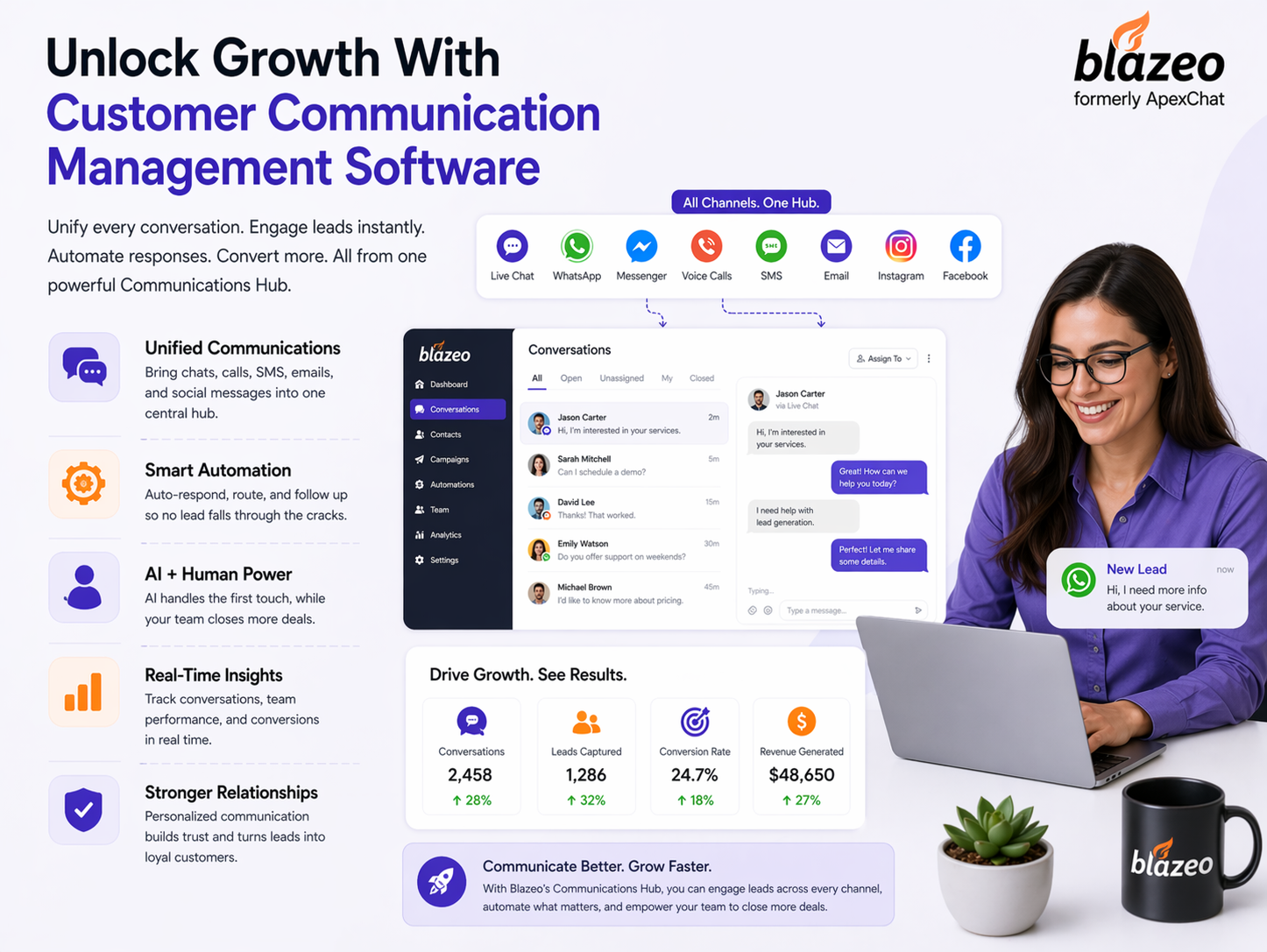
Customer communication management software is a tool that unites all of your messages from customers. All your inbound customer communication email, chat, SMS, and social in one place rather than five different places.
It's more than a pretty email inbox. It's not just another messaging tool. Your team knows all about the customer. No "remind me again what this is about?" No searching emails. The whole story, in one place.
It's designed for support agents, salespeople, small business owners, and anyone else who interacts with customers. If your team has to keep track of multiple conversations each day, you need this.
Customer communications software is about more than just that. It's a comprehensive solution for managing your customer communications.
Let's look at what you should expect:
That last one deserves a mention. Automation rules alone can save your team hours per week. It's one of those features that people don't use and then wonder.
Here's the thing about digital customer communication management. The concept sounds complicated, but the actual workflow is pretty simple once you see it in action.
A customer reaches out. Doesn't matter if it's through email, chat, or a social DM. The platform captures it, tags it based on rules you've set, and routes it to the right person. That agent opens the conversation and sees everything. The customer's past messages, previous issues, and purchase history, if your CRM is connected. They respond. Ticket closed.
No "I'll have to ask someone and get back to you". No "I'll have to ask and get back to you." Workflow tracking means managers can see what's being worked on, what has been missed, and where the process breaks down. Audit trails ensure nothing is questioned in the future.
A customer communication management platform doesn't just benefit one department. It transforms the way you do business from customer support to sales.
Support teams notice it immediately. Support teams respond more quickly because agents aren't "jumping" from tool to tool searching for information. Tickets stay out of the backlog because they get automatically routed rather than being individually assigned.
The unified dashboard gives every agent a clear picture of what's open, what's urgent, and what's been waiting too long. Customers stop feeling like they're being passed around. They feel heard. That's not a small thing.
Sales and marketing get something different out of it. Context. They can see what a customer has asked before, what issues came up, and where they are in the buying process.
That means outreach actually feels personal. Follow-ups go out on time because automation handles the reminders. Retention numbers go up because customers don't feel abandoned between purchases.
Automated customer communications aren't about replacing your team. They're about removing the work your team shouldn't be doing manually in the first place. Welcome emails, onboarding messages, renewal reminders, and follow-ups after a support ticket closes. None of that needs a human to type it out each time. Set it up once, and it runs.
You don't need technical skills to configure most of these. Good platforms make it point and click:
Automated client communication works when it doesn't feel automated. That's the whole challenge. Use the customer's name. Reference their last interaction if you can. Set timing rules so messages go out when they're actually relevant. And know when to hand off to a real person. Some conversations need human judgment, and your system should recognize that. Over-automating is a real mistake. Customers notice when every reply sounds like it came from a script.
Customer communication management software should be the right size for your team and integrate with your existing tools. It shouldn't take 6 weeks to get up and running, and it shouldn't need a developer to manage.
Here are a couple of questions to ask before signing:
Ask about onboarding support and what happens when something breaks. That's when you find out what a company is really like to work with.
For most teams that find customer communications software to be a challenge, it's not about the software. They have a configuration and training problem. It's important to say that because it changes the way you think about it.
The most common mistake is buying a platform and using ten percent of it. Automation features get ignored. Reporting dashboards never get opened. New staff don't get trained properly, and everyone just uses it as a slightly better inbox.
Other mistakes include ignoring where customers actually want to communicate. If your customers prefer SMS and you're only set up for email, that's a real gap. Using five disconnected tools instead of one creates the exact mess this software is supposed to fix.
Digital customer communication management isn't just for tech firms. It's used by retail, health care, finance, and SaaS companies now because solving the problem isn't unique to any one sector.
eCommerce teams handle order updates, returns, and complaints at volume. Medical professionals communicate appointment reminders and patient notes. Banks and financial institutions respond without going astray.
SaaS companies likely get the biggest benefit. They're managing trials, onboarding, renewals, and ongoing support simultaneously. It's difficult to manage without a system.
Customer communication management platforms are moving toward AI-assisted responses, tighter channel integration, and tools that flag problems before they get reported. AI suggestions are already showing up in most platforms. They help agents reply faster by surfacing relevant responses based on past conversations. It's useful in practice, not just on paper.
Omnichannel unification is getting more serious, too. The goal is one continuous conversation thread, whether a customer started on chat, switched to email, and then called in. Predictive tools will eventually tell you which customers are at risk before they actually churn. And as automated customer communications get sharper, the gap between automated and human replies will continue to narrow in ways that actually benefit customers.
At Blazeo, we've been closely watching this evolution. As a customer communication management software provider, Blazeo builds tools designed around how customers actually communicate today, not how they did five years ago.
Q1) What is customer communication management software?
The platform pulls all your customer conversations into one place. Your team manages email, chat, SMS, and social messages from a single dashboard. Agents respond faster, catch everything, and walk into every reply with full context.
Q2) How does automated customer communications save time?
Automated customer communications handle routine messages like welcome emails, reminders, and follow-ups without anyone doing it manually. Your team focuses on real conversations that need judgment, while automation takes care of everything that doesn't.
Q3) What features should I look for in communication management software?
Start with a shared inbox, multi-channel support, automation rules, reporting, and CRM integration. Those five cover most of what teams actually need. Everything else is a bonus depending on your specific workflow and team size.
Q4) Who needs a customer communication management platform?
Any business handling high volumes of customer messages benefits from a customer communication management platform. eCommerce stores, SaaS companies, healthcare providers, and financial services teams all use it to manage support, sales, and retention in one place.
Q5) What is the difference between CCM software and CRM?
A CRM stores customer data and tracks relationships over time. CCM software manages the actual messages and conversations. They serve different purposes but work well together. Most businesses that use one end up needing the other eventually.
Q6) How does digital customer communication management improve response time?
Digital customer communication management routes messages automatically, eliminates manual sorting, and gives agents full conversation history upfront. Teams spend less time searching and more time actually responding, which cuts average reply times in a meaningful way.
Q7) Can small businesses use automated client communication tools?
Automated client communication helps small businesses the most. When staff is limited, it steps in and fills the gaps. One person can take on far more messages, stay on top of everything, and avoid burnout.
Q8) How do you get started with customer communications software?
List the channels your customers use most, then choose customer communications software that supports those channels and connects with your existing tools. Most platforms offer a trial period. Use it with real conversations before you commit to anything long-term.
Businesses that keep losing customers often have one thing in common. Fragmented, slow, and inconsistent communication. Customer communication management software fixes that by bringing every conversation together, cutting response times, and giving teams the full context they need to actually help people. The results show up quickly when teams commit to using the platform properly.
You know what this tool can do, what to look out for, and what teams often do wrong. So, stop losing customers to online silence and lag time? Choose a platform you like, keep it simple, and evolve. Don't wait until the next customer leaves before you fix the problem.