 SmartHub
 Automation
 Appointment Scheduler
 Lead Management
 Dashboard & Reports
 Task Management
 Communications Hub
 Managed chat
 Voice Receptionist
 Appointment scheduling
 Retainer signing
 Home services
 Lawyers and firms
 Medical services
 College admissions
 Real estate agents
 Marketing agencies
 About
About Partner program
 Estimate Your ROI
 Case Studies
 Blog
Blog FAQs
FAQs Login
LoginBlazeo Live Chat Pricing: What Does Managed Live Chat Cost?




Products
Industries
Company
Resources

What should a business actually pay for website chat? Live Chat Pricing gets harder to compare when one option is software and another includes human service. A chat platform can give you the widget and inbox. Managed live chat may also cover agents, training, coverage, lead qualification and service management. Those are different costs, even when both products place a chat box on your website. This guide explains the main pricing models, what changes the monthly bill, how 24/7 coverage works and how chat can move a visitor toward a qualified lead or booked appointment. Real estate is used as a practical example because appointment scheduling is often part of the buying decision.
Managed live chat can cover much more than the chat interface. Depending on the provider, the monthly service may include people, setup, training, conversation handling, lead capture, reporting and ongoing account support.
Blazeo's pricing page currently lists live chat plans starting at $49 per month. It lists 24/7/365 managed live chat, industry-trained agents, unlimited customer interactions, proactive chat, custom greetings and chat flows, reporting and email lead delivery notifications. Appointment Scheduling and CRM integration are listed on Pro, Pro+ and Advanced plans.
Software gives your team a tool for talking with visitors. A managed service can add trained agents who handle those conversations for you. The pricing question is therefore not only about software access. It is also about who does the work.
Onboarding can include FAQs, a knowledge base, greetings, scripts, routing, CRM connections, lead delivery and agent training. These items shape the service because agents need clear instructions on what to ask, capture and pass to your team.
Coverage hours can change the service scope. Business-hours support uses a smaller staffing window. Extended hours, weekends, overflow, or 24/7 coverage keep conversations open for longer and require a different coverage plan.
Managed services may also include transcripts, reports, conversation monitoring, quality checks and account support. These are ongoing operating tasks, not simply features inside a chat widget.
Before comparing prices, identify how the provider charges. Software seats, usage limits, managed monthly plans and pay-per-lead services measure different things.
| Model | Who handles chats? | Billing unit | Questions to check |
| Per-seat software | Your team | User or seat | How many users need access? |
| Usage-based | Your team, AI, or both | Conversations or usage | What counts as billable? What happens after the limit? |
| Flat-rate managed | Provider's agents | Monthly service | What hours and interactions are included? |
| Pay-per-lead managed | Provider's agents | Accepted or qualified lead | How is a lead defined and charged? |
Per-seat plans scale with the people using the platform. LiveChat currently lists Starter at $19 per person per month when billed annually. Zendesk lists live chat software at $19 per agent per month billed annually. These are software prices, not outsourced staffing costs.
Usage pricing ties the bill to activity. Tidio currently lists Starter at $24.17 per month with 100 billable conversations. Check the definition of a billable conversation, included volume and any higher-usage charges before comparing plans.
A flat monthly plan can bundle software, human agents, setup and service management. Chat Agents currently advertises a $249 monthly managed plan with live agents and unlimited chats. That is a published provider price, not a general market rate.
Pay-per-lead pricing links the bill to accepted leads instead of a fixed chat count. LiveAdmins currently advertises fully managed live chat starting at $399 or $15 per lead. Ask how a lead is defined and whether qualification rules affect which chats become billable.
Learn: How AI Chatbots Combine Automation With Human Live Chat
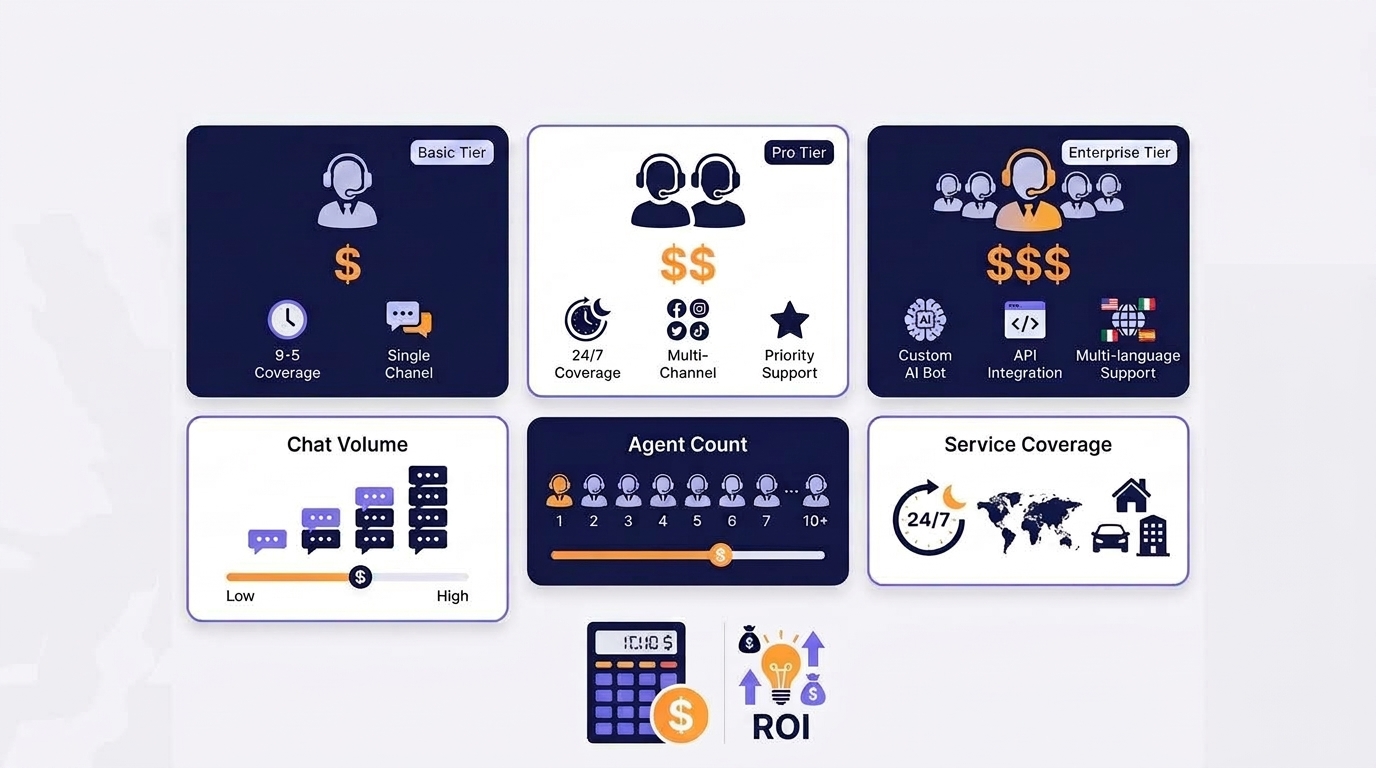
The monthly price usually follows the work your chat service must handle. Traffic, conversation volume, coverage, specialist training and integrations can all change the service you need.
Start with website visitors and expected chat starts. Then look at peak periods and likely lead volume. A busy website may need more capacity than a low-traffic site, even when both businesses use the same chat software.
Coverage can mean business hours, evenings, weekends, or 24/7 support. Response targets, simultaneous chats and overflow also matter. A campaign that creates a sudden spike may require more coverage than a normal week.
Specialized businesses may need more detailed workflows. Legal, healthcare, financial and similar sectors can require stricter intake steps or secure lead handling. Ask what training, processes and safeguards are included for your industry.
A fuller workflow can send lead details to a CRM, trigger email or SMS alerts, check a calendar, book an appointment, or transfer a conversation. Each connection serves a purpose, but each can add setup and management work.
For live chat pricing for small businesses, start with expected conversations, not the longest feature list. Estimate monthly visitors, likely chat starts and how many conversations may become real sales opportunities.
Separate total chats from qualified leads. Then choose the coverage window: business hours, extended hours, weekends, overflow, or 24/7.
That turns live chat pricing for websites into a clearer planning exercise. Next, list the integrations your team will actually use, such as CRM routing, calendar booking, lead alerts, or reporting.
Finally, compare the monthly charge with the work being handled: conversations, qualified leads, appointments and follow-up. That gives you a better view of website live chat service cost than comparing features alone.
24/7 service changes the operating question. It is not only about placing chat on a website. Someone, or something, must be available to respond at night, on weekends and during periods when your in-house team is offline.
Business-hours coverage limits the staffing window. 24/7 coverage extends it through nights and weekends. Neither model fits every business. Look at visitor patterns, lead value, response expectations and how quickly inquiries need a reply.
AI can answer routine questions and guide visitors through set flows. Human agents can handle conversations that need context, qualification, or a personal response. Hybrid coverage combines both, so ask where human handoff starts and what happens next.
“Unlimited” still deserves questions. Check fair-use terms, concurrent chats, lead definitions, response expectations, exclusions and support boundaries. The word describes the charging model, but it does not tell you the full staffing or service capacity.
Real estate makes the chat-to-appointment path easy to see. A visitor may ask about a listing, a neighborhood, or the next available showing. The useful part is what happens after that first question.
A buyer or seller conversation may collect property interests, area, timeline, budget, financing or pre-approval status and contact details. The exact questions should follow the brokerage's own lead qualification process.
A showing request or listing consultation can move from chat to a calendar. Blazeo currently lists Appointment Scheduling on Pro, Pro+ and Advanced plans, while its scheduling service describes booking through chat and calendar integrations.
Some visitors will want a phone conversation once the basics are clear. Chat can start the interaction, then hand the person to a live call or transfer. The handoff should preserve the important lead details and conversation context.
Ask about agent coverage, lead qualification, CRM delivery, calendar booking, after-hours support and human escalation. Also confirm whether the service charges per lead, per month, per chat, or through a combination of these.
A useful live chat pricing comparison starts with the invoice and works backward. Ask what the monthly number actually buys:
For Blazeo, verify the live pricing page at publication. Its current page lists live chat plans starting at $49 per month and shows managed 24/7/365 chat, industry-trained agents, unlimited customer interactions, proactive chat, reporting and plan-based appointment scheduling and CRM integration.
Review the current Blazeo live chat plans or request a demo to compare the service scope with your traffic, coverage and lead workflow.
Some live chat software has free plans or trials. Tidio currently lists a $0 Free plan, while paid software and managed human chat have different limits and costs. Free access does not mean the same features or staffing are included.
Yes, many services charge for live chat. The bill depends on whether you are buying software, AI usage, managed agents, seats, conversations, leads, or a mix. Compare the billing unit and the service included.
There is no single price for a website chat agent. An in-house employee, outsourced managed chat and software used by your own team involve different staffing, coverage and service costs.
There is no universal price difference. Compare software, staffing, chat or call volume, minutes, integrations, appointment scheduling, routing and ongoing management. The implementation scope matters more than the channel name alone.
Live chat pricing is easier to judge when you compare the work behind the monthly number. Traffic, chat volume, coverage, staffing, training, integrations and lead handling can all change the bill. Review the current Blazeo plans and compare those details with the conversations and appointments your business needs handled.

